


Enterprise data environments rarely consist of a handful of tables. Production data models in organizations like financial services firms, healthcare systems, and technology enterprises typically span 50 to 100 tables, each with 10 to 15 columns. Testing data quality across all of these tables manually is unsustainable.
According to Gartner, 60% of data management tasks will be automated by 2027. For data quality testing specifically, manual rule creation becomes a bottleneck the moment a data model exceeds 20 tables. Writing SQL validation queries by hand for every column across every table is a process that does not scale.
Key Takeaways
- The Datagaps DataOps Suite’s AI-powered Rules Wizard generates data quality test cases automatically by analyzing table structures, column types, and data patterns, eliminating the need for manual SQL authoring.
- Severity settings (Low, Medium, High) directly control how many rules the AI generates per column, with High severity producing multi-dimension rules covering validity, uniqueness, conformity, and range checks.
- Splitting large data models into groups of 5 tables per generation cycle and iterating across severity levels is the most reliable approach for scaling past 500 rules.
- The AI assigns data quality dimensions (Validity, Completeness, Unicity, Consistency, Timeliness, Accuracy, Conformity) automatically based on column name and data type, though human review remains essential for edge cases.
- With 20 tables averaging 5 to 10 columns each, teams can generate 200+ baseline rules with zero manual effort, then scale to 500+ by adjusting severity and adding business-specific prompts.
Why Does Scaling Data Quality Rules Matter for Enterprise Data Teams?
When a data model grows beyond 20 tables, each with 10 or more columns, manually authoring SQL validation rules for every column becomes a resource drain that slows release cycles and leaves gaps in test coverage. Teams need a way to generate rules programmatically, across all tables and dimensions, without writing code.
The Datagaps DataOps Suite, listed in both Gartner’s Market Guide for DataOps Tools (October 2025) and Market Guide for Data Observability Tools (February 2026), addresses this challenge with an AI-powered Rules Wizard that generates comprehensive data quality test cases directly from your data model’s metadata.
This guide walks through the complete process of generating 500+ data quality rules using the Rules Wizard, including the specific settings, prompt strategies, and iteration approach that produce the best results at enterprise scale.
How Does the AI Rules Wizard Work in the Datagaps DataOps Suite?
The Rules Wizard sits inside the Datagaps DataOps Suite’s Data Quality module. It uses generative AI to analyze your selected tables and columns, then produces data quality rules complete with rule names, descriptions, SQL validation queries, and data quality dimension classifications.
The generation process follows five steps:
- Select tables and columns from your connected data model.
- Provide a prompt describing what types of rules you want generated.
- Choose a severity level (Low, Medium, or High) to control rule depth.
- Generate rules and review the output.
- Iterate by adjusting prompts, severity, or table groupings and regenerating.
The AI does not require you to specify which data quality dimension applies to each column. It determines the appropriate dimension (Validity, Completeness, Unicity, Consistency, Timeliness, Accuracy, or Conformity) based on column name, data type, and context.

What Happens When You Generate Rules with Default Settings?
To establish a baseline, consider a data model with 12 tables inside the Datagaps DataOps Suite. Starting with just 2 tables and 6 to 7 columns total, using the default severity setting (Medium) and a standard prompt, the AI generated approximately 5 rules across the two tables.
For simple columns like CategoryID and CategoryName, the AI recognized that the most critical validation was a null check. Since these columns are straightforward identifiers and labels, a null validation under the Validity dimension was the appropriate test.

For columns like CustomerID, the AI went further. It generated not only a null check (Validity) but also a duplicate check (Unicity), recognizing that a primary key column should contain unique values. This pattern detection happens automatically based on column naming conventions and data type analysis.
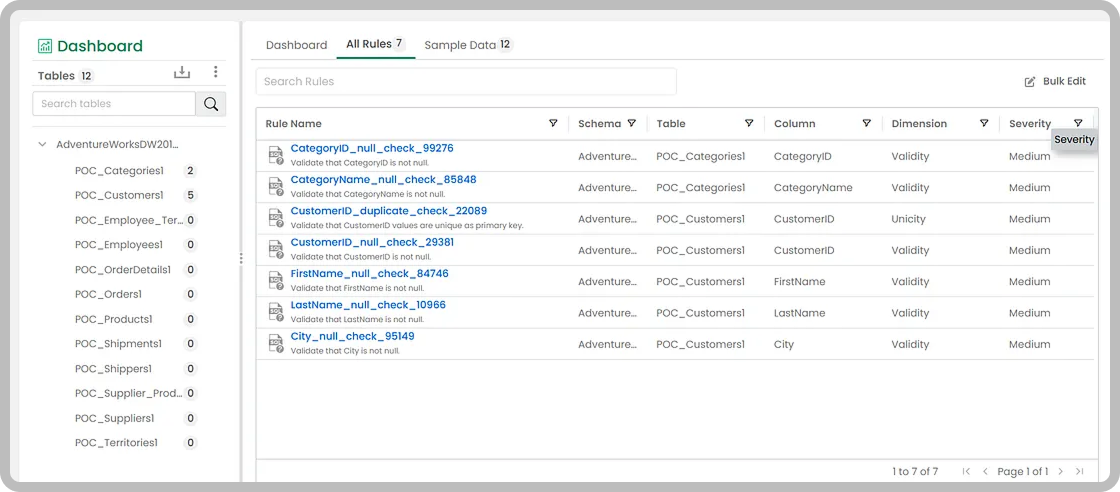
Each generated rule includes a complete SQL query that can be executed against your data source. The rule editor allows you to modify any generated rule, including the SQL query, rule name, description, and data quality dimension.

How Does Severity Level Affect the Number of Rules Generated?
Severity is the single most important setting for controlling rule volume. Changing the severity from Medium to High dramatically increases the number and variety of rules the AI generates per column.
At Medium severity, the AI generates one rule per column, typically a null or validity check. This is appropriate for tables that do not require deep validation.
At High severity, the AI generates multiple rules per column across several data quality dimensions. For a column like EmployeeID, High severity produced three distinct rules:
- A null check under Validity (identifying records where EmployeeID is null)
- A duplicate check under Unicity (identifying records where EmployeeID appears more than once)
- A positive range check under Validity (identifying records where EmployeeID is less than or equal to zero)

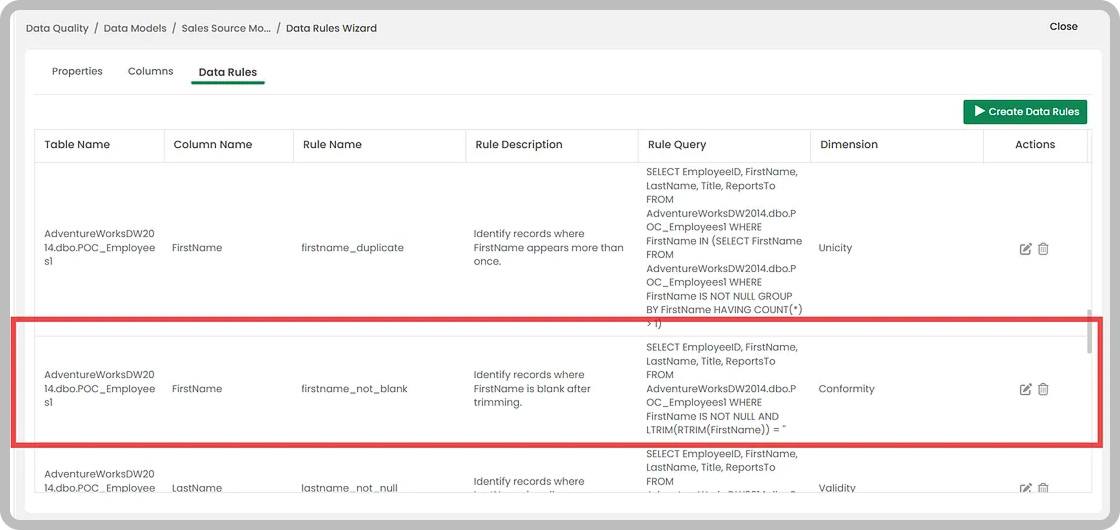
The AI also demonstrates contextual intelligence at High severity. For a FirstName column, it generated rules checking for duplicates (Unicity) and blank values after trimming (Conformity). The conformity check specifically validates that names do not contain only whitespace characters, a check the AI inferred entirely from the column name and data type.
Where Can AI Misinterpret Column Context, and How Do You Fix It?
AI-generated rules require human oversight. The generative model interprets column purpose based on naming conventions and data types, but edge cases exist where this interpretation is incorrect.
A practical example: a column named ReportsTo in an Employees table. The AI interpreted this column as numeric and generated a positive range check, assuming it contained numeric IDs. In practice, this column stored the name of the manager each employee reports to, making it a text field. The range check was not applicable.

These edge cases are manageable. You can edit any rule directly in the Rules Wizard, change the data quality dimension, update the SQL query, or delete the rule entirely. The Datagaps DataOps Suite also supports AI-generated column descriptions. If column descriptions are accurate and up to date, the rule generation becomes significantly more precise because the AI has additional context about what each column contains.
The recommendation is to generate and review column descriptions using the Datagaps DataOps Suite’s AI description generation before running rule generation. Accurate descriptions reduce misinterpretation and improve the relevance of generated rules.
What Is the Best Strategy for Generating 500+ Rules Across a Large Data Model?
Generating hundreds of rules across a data model with 20 or more tables requires a structured iteration approach. Token limits in AI models constrain how many rules can be generated in a single pass, so batching is essential.
The recommended approach:
Group your tables in batches of 5. For a 20-table data model, this means 4 generation cycles. Smaller batches give the AI more token budget per table, which produces more comprehensive rules per column.
Assign severity based on table criticality. Not every table needs High severity. Tables containing core business entities (customers, orders, financial transactions) benefit from High severity to generate multi-dimension rules. Reference or lookup tables can use the default Medium severity.
Use domain-specific prompts for critical tables. The standard prompt generates generic rules across all data quality dimensions. For tables with specific business requirements, add context to the prompt. For example, specifying that an order amount column should only contain values within a defined range, or that a date column should never contain future dates.
Update RAG after each generation cycle. Every time you generate new rules, the Retrieval-Augmented Generation index within the Datagaps DataOps Suite needs to be refreshed. It is more efficient to generate all rules first, then update RAG once, rather than updating after every batch.

A practical calculation: With 20 tables averaging 5 to 10 columns each, Medium severity generates approximately 1 rule per column (100 to 200 rules total). Switching critical tables to High severity produces 3 to 4 rules per column for those tables. Adding business-specific prompts can push generation to 5+ rules per column for targeted tables. Reaching 500+ rules across a 20-table model is achievable in 4 to 5 generation cycles, typically under 2 hours of total effort. Each generation cycle itself takes 30 to 60 seconds. The primary time investment is reviewing output and refining prompts between iterations.
This approach is data-source agnostic. The Rules Wizard works with any data source connected to the Datagaps DataOps Suite, including Microsoft Fabric, Snowflake, Databricks, Azure Synapse, Oracle, Amazon Redshift, and 200+ additional systems, because rule generation operates on the data model metadata rather than the underlying platform.

What Should You Know About Prompts for AI Rule Generation?
The prompt you provide to the Rules Wizard directly shapes the types of rules generated. There are two categories of prompts to prepare:
Generic prompts work across all tables and columns. These instruct the AI to generate comprehensive data quality checks covering null validation, duplicate detection, range checks, format validation, and referential integrity. Keep a standard generic prompt ready for baseline generation across all tables.
Domain-specific prompts target particular business requirements. These are more effective for critical tables where you need the AI to generate rules that reflect specific data constraints. For example, instructing the AI to check whether a column contains values from an approved list, whether dates fall within a business-relevant range, or whether numeric values meet threshold requirements.
A few practical notes on prompt formatting:
- Write prompts in plain English. The system prompt within the Datagaps DataOps Suite already contains the processing instructions for rule generation. Your prompt only needs to specify what you want tested.
- Avoid special characters. The AI prompt parser may not process certain symbols correctly. If you encounter a “No Rules Generated” error, remove any special characters from your prompt and retry.
- Combine the generic prompt with a domain-specific prompt for the best results on critical tables.

Conclusion
Scaling data quality testing from a handful of manual checks to 500+ automated rules is no longer a multi-sprint engineering project. With the Datagaps DataOps Suite’s AI-powered Rules Wizard, enterprise data teams can generate comprehensive, multi-dimension data quality rules across their entire data model using prompts and configuration settings alone.
The approach is straightforward: batch your tables, adjust severity based on criticality, layer generic and domain-specific prompts, and iterate. The AI handles rule naming, SQL generation, and dimension classification. Your team focuses on reviewing, refining, and deploying.
For organizations managing data quality across Snowflake, Microsoft Fabric, Databricks, or any of 200+ supported platforms, this capability transforms data quality testing from a reactive, manual process into a proactive, scalable practice. Every generated rule feeds directly into the Data Quality Score on the Datagaps DataOps Suite dashboard, giving you a continuously updated, granular view of your data health across every table and dimension. The more rules you generate, the more precise that picture becomes.
Frequently Asked Questions
How does the Datagaps DataOps Suite generate data quality rules automatically?
The AI-powered Rules Wizard analyzes the metadata of the tables and columns you select, including column names, data types and context. For each rule it produces a name, description, executable SQL validation query and a data quality dimension (Validity, Completeness, Unicity, Consistency, Timeliness, Accuracy or Conformity). You pick the tables, write a prompt, choose a severity level, then generate and review. No manual SQL is needed.
How does the severity level affect the number of rules generated?
Severity is the main control over rule volume. Medium (the default) generates about one rule per column, usually a null or validity check. High generates several rules per column across multiple dimensions. For example, an ID column gets a null check, a duplicate check and a positive-range check. Use High for critical tables such as customers, orders or financial transactions. Use Medium for reference or lookup tables.
Can the AI get a column wrong, and how do I fix it?
Yes, human review is still needed. In the blog’s example, the AI treated a ReportsTo column as numeric and generated a positive-range check, but the column actually stored manager names. You can edit any generated rule’s SQL, name, description or dimension, or delete it. You can also generate AI column descriptions before running rule generation, which gives the AI more context and reduces misinterpretation.
Which data sources does the Rules Wizard support, and what should I know about prompts?
It works with any source connected to the Datagaps DataOps Suite, including Microsoft Fabric, Snowflake, Databricks, Azure Synapse, Oracle, Amazon Redshift and 200+ others, because it works from metadata rather than the underlying platform. Write prompts in plain English and avoid special characters. If you see a “No Rules Generated” error, remove special characters and retry.
What is the best way to reach 500+ rules across a large data model?
- Split the model into batches of about 5 tables per generation cycle. For 20 tables, that is 4 cycles.
- Set severity by table criticality.
- Combine a generic prompt with domain-specific prompts for critical tables.
- Refresh the RAG index once after all generation cycles, not after each batch.
Each cycle takes 30–60 seconds, and the whole process typically takes under 2 hours, most of it spent reviewing output.

RajMohan Achanta
Associate Product Manager, Datagaps
Associate Product Manager at Datagaps. Shapes the product experience across ETL Validator, BI Validator, and Data Quality Monitor.

Avinash Keshri
Head, Product Marketing
Head of Product Marketing at Datagaps and IIM Bangalore alumnus. 13+ years of experience in commercializing AI and data platforms across global markets.


