


An audit-ready ETL migration is a migration where every claim that the data moved correctly is backed by evidence: a baseline, a test manifest, reconciliation results, exception reports, and approvals. Audit readiness does not guarantee compliance. It gives reviewers the proof they need to assess it.
Cutover is where migration risk becomes a business decision. A reviewer will ask what was compared, against which baseline, and with what result. This guide covers the evidence to collect and the checks to run, from the first load to rollback triggers, using Datagaps DataOps Suite for the examples. Figure 1 shows the path.
Key Takeaways
- Audit-ready means every claim that data moved correctly has evidence behind it, from the baseline to the approvals.
- Agree acceptance criteria before the first load, so tests prove something specific and reviewers know what to look for.
- Reconcile at the right grain: totals for scale, aggregates for business meaning, and record-level comparison where one wrong row matters most.
- Cutover is a decision, so set exit criteria, a go or no-go gate, and rollback triggers in advance, and keep the evidence for each.

What Makes an ETL Migration Audit-Ready?
Start with acceptance criteria written before testing: what counts as parity, which tolerances apply, which tables need record-level proof, and who approves exceptions. Without them, a test result has nothing to be measured against.
The stakes are not abstract. A McKinsey survey of nearly 450 CIOs and IT leaders found that 75% of cloud migrations ran over budget and 38% ran behind schedule. Regulators also ask for accurate, reliable data with little manual handling: the Basel Committee’s BCBS 239 principles for risk data aggregation call for accurate and reliable data, aggregated largely on an automated basis.
The table below lists the evidence pack, what each artifact proves, and how Datagaps DataOps Suite produces it.
| Artifact | What it proves | How DataOps Suite produces it |
|---|---|---|
| Acceptance criteria | What migrated correctly means, with tolerances | Mappings and rules agreed up front. Mapping Manager keeps mappings with Business and Technical Transformation fields and exports them to Excel |
| Source baseline | Counts, distinct keys, NULLs, and aggregates at a point in time | Data Profile and Metrics Compare runs, kept in run history |
| Test manifest | Which checks ran, on which tables, with which queries | Saved dataflows and their queries, generated from mapping documents and reviewed |
| Parity results | Source and target match by record and by aggregate | Data Compare reports, Metrics Compare, and Cross Source Compare results |
| Exception report | Each mismatch, its cause, and its disposition | Mismatched, missing, and duplicate records; bad-record tracking in DataOps Data Quality with Open, Resolved, or Ignored status; a Jira ticket from a failed batch run |
| Approvals and access trail | Who ran, changed, and approved what | Audit logs with user, feature, activity, and timestamp, with export; sign-off recorded in your change system |
Audit readiness does not guarantee compliance, because compliance decides what an examiner needs. Use the table to agree on the pack with compliance before the first load.
How Do You Set the Baseline and Grain for Data Parity Testing for ETL Migration?
Data parity testing for ETL migration proves that the target matches the source at a chosen grain. Choose the grain by risk:
- Table level: counts and distinct keys for every table, for scale.
- Aggregate level: totals and distributions by a business dimension, such as period or region, for business meaning.
- Record level: full comparison on the business key for the tables where one wrong row matters most.
Take the baseline from the source before the first load, and set tolerances by risk: exact match for keys and amounts, and a stated threshold where rounding or time zones can legitimately differ. Data Profile captures the baseline, Metrics Compare reconciles aggregates against thresholds (Figure 2), Data Compare matches records on a unique key, and Cross Source Compare reports Pass or Fail per group with a variance for each measure.

How Do You Validate Bulk Loads, Deltas, and Transformations in Cloud Data Migration Validation?
Validate in the order the data arrives. After the initial bulk load, compare counts, aggregates, and records. For each delta or incremental load, rerun the same checks on the changed window, so late or repeated changes surface in the cycle that caused them. For transformations, generate tests from the mapping documents so every business rule has a check, and review the generated SQL before the first run. See ETL testing automation: from mapping documents to reviewed tests.
Precision, Null Semantics, Schema Changes, and Duplicates
These four cause most silent parity failures: values that round or cast differently, NULL and empty-string handling that varies by engine, schema changes made mid-migration, and rows loaded twice. Compare metadata before data, use thresholds for documented tolerances, check uniqueness on the business key, and watch for schema drift between cycles. The checks and examples are in data integrity testing during data migration.
Snowflake ETL Testing and Other Cloud Targets
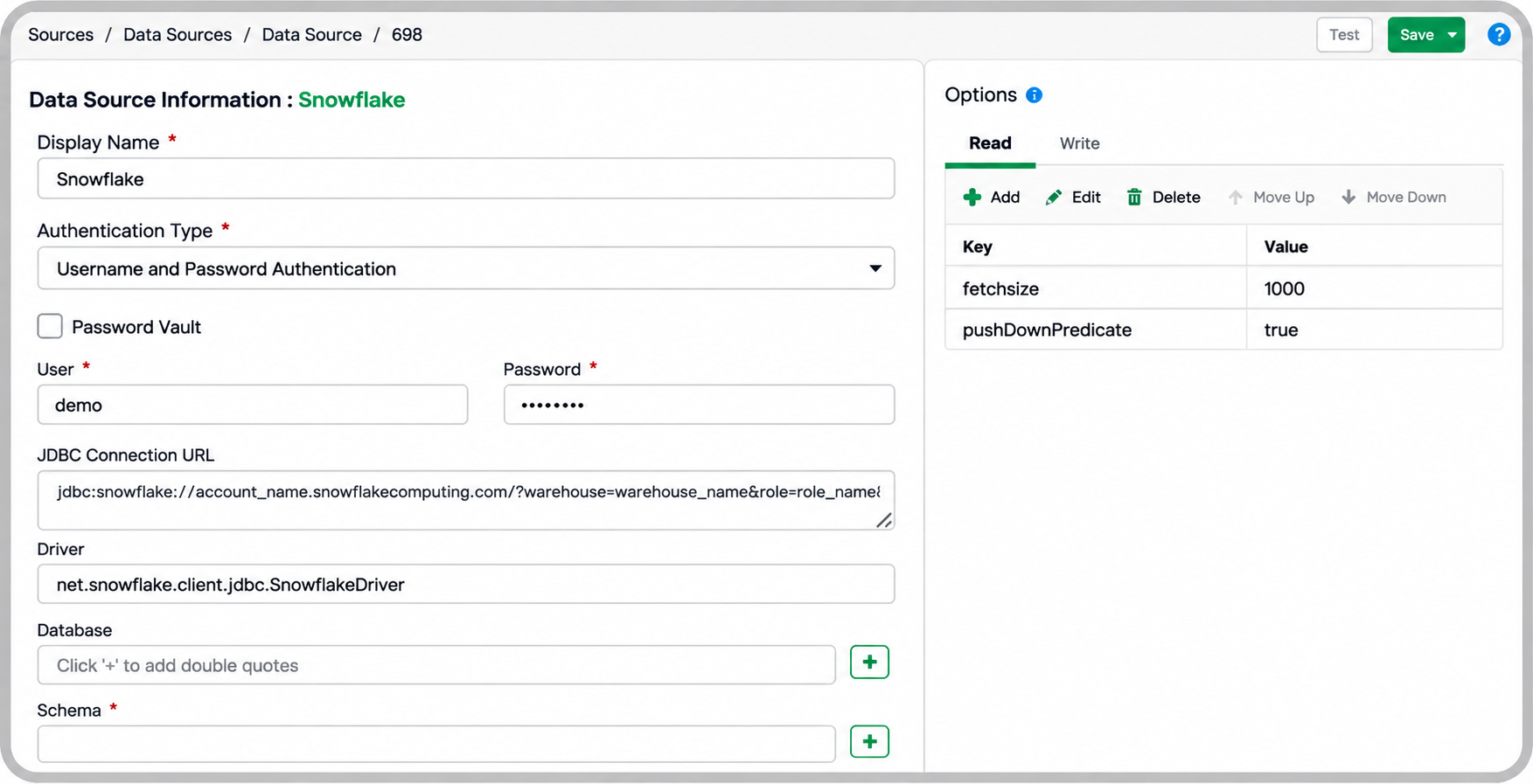
Cloud targets change how you connect and where checks run. For Snowflake, DataOps Suite supports username and password, key pair, user profile, and OAuth authentication, and a password vault can hold the credentials (Figure 3). Datagaps describes its Snowflake testing automation as validating and scoring data inside Snowflake with SQL pushdown, catching schema drift and migration gaps, and DataOps Suite is now a connected app on the Snowflake AI Data Cloud. For walkthroughs, see Snowflake data migration testing and data validation in Snowflake data migration.
Other cloud targets follow the same pattern. Datagaps describes validating Delta Lake tables from Bronze to Gold inside notebooks for Databricks, Fabric data from OneLake ingestion through to Power BI semantic models for Microsoft Fabric, and Synapse migrations and Medallion-layer transformations, with tests running in Azure DevOps, for Azure Synapse.
Why Do Parallel Runs and Rollback Triggers Decide a Safe Cutover?
Bulk-load checks prove the data arrived once. They do not prove the new pipeline behaves like the old one under real, repeating load, and they do not say when to stop. Parallel runs answer the first question and rollback triggers answer the second, which is why cutover is where audit evidence carries the most weight.
Run the legacy and cloud pipelines on the same inputs and compare the outputs each cycle. Agree the exit criteria in advance, for example no unexplained mismatch above tolerance in critical tables for an agreed number of consecutive cycles. Track every exception to a disposition, and rerun after each fix, so the passing cycles become evidence.
Then make cutover a gate. The sign-off pack is the baseline, the manifest, the last passing parity results, and every exception with its disposition. Define rollback triggers before cutover: an unexplained mismatch above tolerance, missing records, failed relationship checks, or reconciliation that cannot finish inside the window. Decided in advance, the call to go back is made on criteria, not under pressure.
Schedule the comparisons, notify the team by email or Microsoft Teams, and let the command line report each run’s job status, so a release job can read it as the gate. After cutover, compare the first full production cycle, confirm that reports match the source with BI Validator, and keep monitoring freshness, volume, and schema changes.
The data reconciliation page and the post on automated AI data reconciliation for large-scale migrations cover the techniques. Regulated teams in financial services, healthcare, and life sciences typically need this pack, as the post on ETL data validation for regulatory compliance explains.
Conclusion: How Do You Prove a Cloud Migration Is Ready to Cut Over?
Decide what proof you need before you move any data: acceptance criteria, a baseline, and tolerances. Then reconcile at the right grain, run parallel cycles until the exit criteria hold, and cut over through a gate with rollback triggers already defined.
ETL Validator, part of Datagaps DataOps Suite, produces the parity results, exception reports, and audit trail that make up the pack. For the full lifecycle, see the complete guide to data migration testing and data migration testing automation.
Frequently Asked Questions
What Is an Audit-ready ETL Migration?
A migration in which every claim that data moved correctly is backed by evidence: a baseline, a test manifest, reconciliation results, exception reports, and approvals.
What Is Data Parity Testing for ETL Migration?
Data parity testing proves that the target matches the source at a chosen grain: counts, aggregates by business dimension, or individual records. It sets tolerances in advance and records every exception.
How Do You Validate a Data Migration to Snowflake?
Connect the source and Snowflake, take a baseline from the source, compare counts, aggregates, and records after the bulk load, rerun the checks on each delta, and watch for schema drift. See Snowflake testing automation.
Does an Audit-ready Migration Mean It Is Compliant?
No. Evidence supports an audit but does not guarantee compliance. Compliance decides what an examiner needs, so agree on the evidence pack with compliance before the first load.
Book a personalized 30-minute demo and bring one migration workload,
or start a 14-day free trial.

RajMohan Achanta
Senior Associate Product Manager, Datagaps
Senior Associate Product Manager at Datagaps. Shapes the product experience across ETL Validator, BI Validator, and DataOps Data Quality.

Avinash Keshri
Head, Product Marketing
Head of Product Marketing at Datagaps and IIM Bangalore alumnus. 13+ years of experience in commercializing AI and data platforms across global markets.


