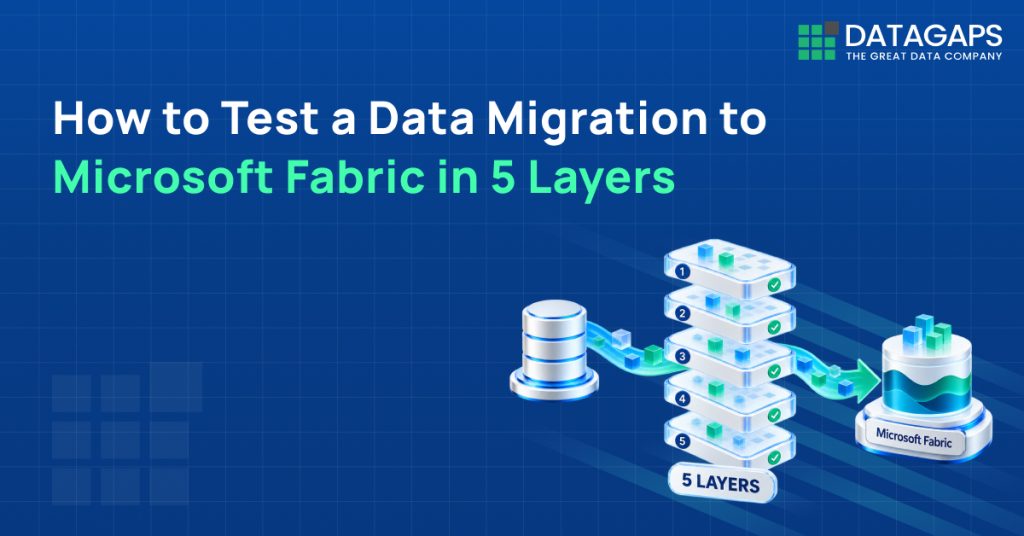
Microsoft Fabric migration testing verifies that data moved into Fabric is structurally and factually accurate. Datagaps validates migrations through five no-code dataflow layers: metadata comparison, data profile comparison, source-to-target data comparison, transformation validation and BI report validation.
Key Takeaways
- Fabric’s Migration Assistant helps execute migrations but does not automatically verify that migrated data is accurate.
- Start with metadata comparison to catch data type, column length, foreign key and nullability mismatches.
- Profile comparison confirms row counts, null percentages, distributions and distinct counts match across both systems.
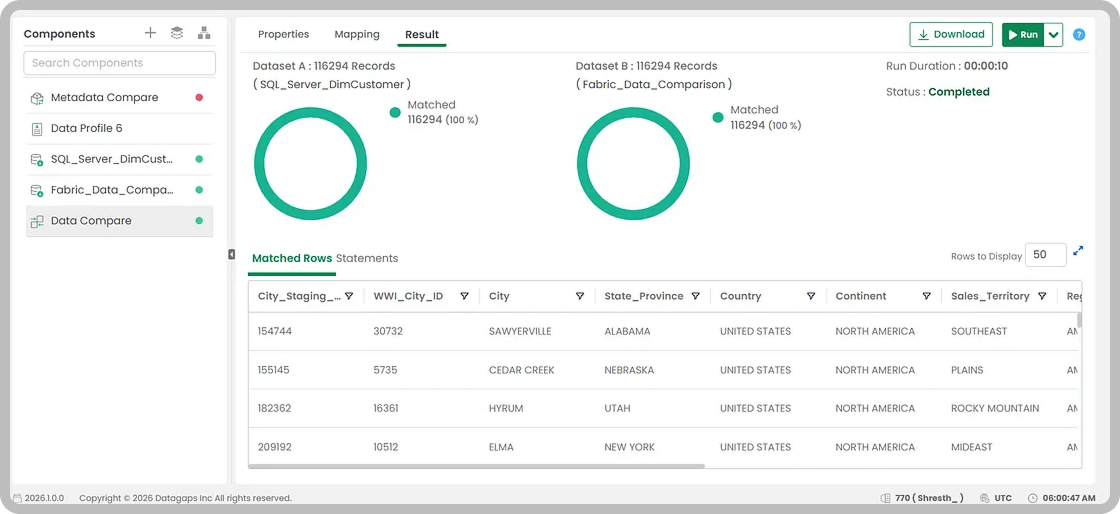
- Data Compare reports matched rows, source-only and target-only rows, duplicates and column-level differences.
- BI Analytics components compare Power BI and Tableau reports visually and at the data level.
To test a data migration to Microsoft Fabric, validate it in layers: compare metadata between source and target, compare data profiles, compare records row by row, validate transformations, and confirm BI reports still return accurate data. Datagaps runs all five layers in a dataflow-based framework without custom code.
Why does a Microsoft Fabric migration need separate validation?
Organizations across industries are increasingly moving their data workloads to Microsoft Fabric – some from SQL Server, others from Synapse, and many from a mix of legacy enterprise data warehouses, Azure Data Factory pipelines, or hybrid systems that have grown over time.
Microsoft Fabric brings together data engineering, warehousing, lakehouses, Power BI, notebooks, pipelines, AI, and analytics in a unified platform, which explains much of the momentum behind this shift. But moving to a new platform involves more than executing the migration itself. Validating that the outcome is accurate matters just as much.
This guide walks through a practical approach to data migration testing for Microsoft Fabric, including how to use Datagaps to validate migrations in a structured way instead of relying on manual SQL checks alone.
What does Microsoft Fabric already offer for migration?
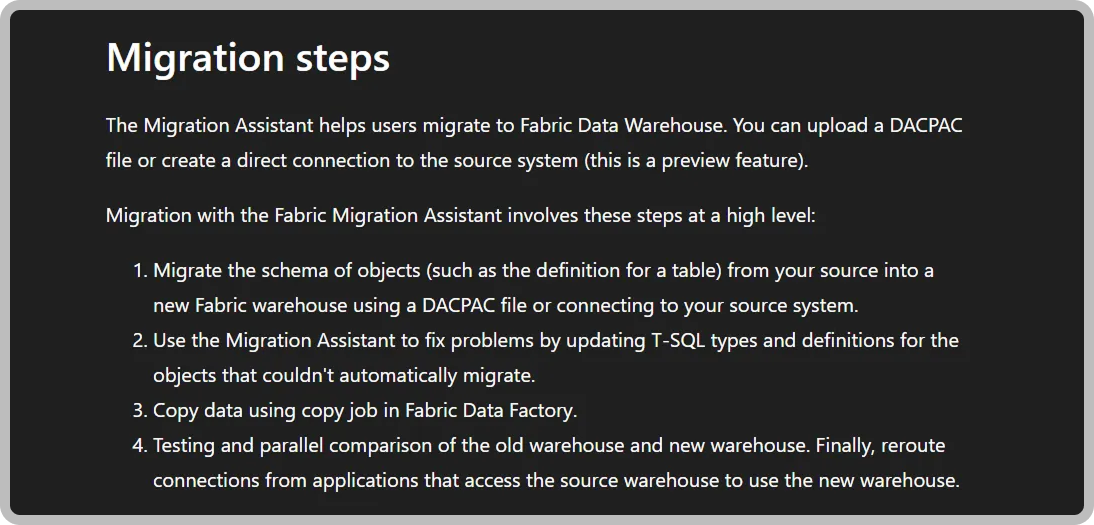
Microsoft Fabric includes several built-in capabilities that help simplify the migration process. The Fabric Migration Assistant for Data Warehouse migrations, for example, helps organizations move workloads into Fabric with significantly less manual effort.
For teams migrating from SQL Server or Synapse, the Migration Assistant can identify which objects migrate directly and which ones need adjustments – reducing the overhead of rebuilding schemas from scratch.
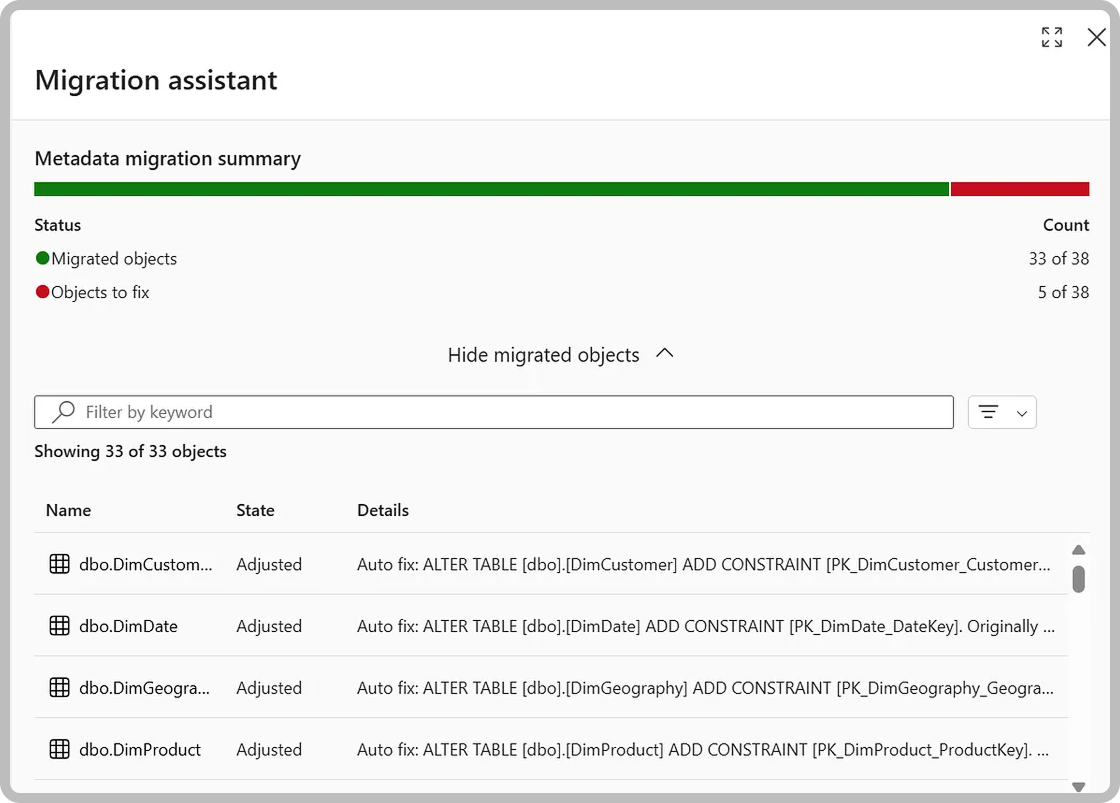
While Fabric assists with executing the migration, it does not automatically verify that the migrated data is fully accurate from a testing standpoint. Migration testing tends to be more involved than teams initially expect, and the right tooling helps them identify and resolve issues more efficiently.
What should be tested during a Microsoft Fabric migration?
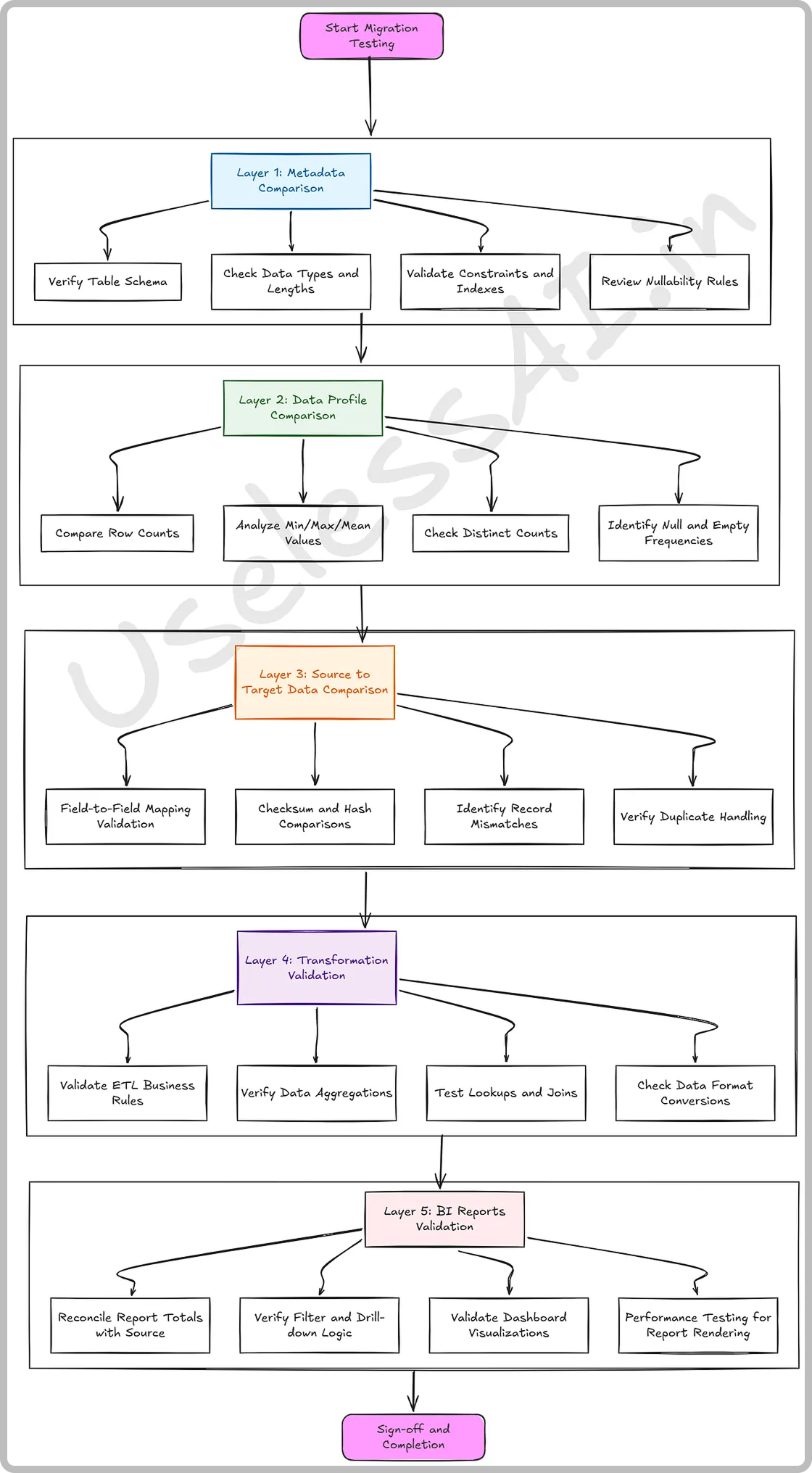
Test structure, statistics, records, business logic and reports. The core concepts of migration testing remain consistent regardless of which platform is being migrated to. Datagaps approaches this in five layers, each addressing a different aspect of data accuracy and consistency.
| Layer | What it validates | Datagaps component |
|---|---|---|
| 1. Metadata comparison | Data types, nullability, primary keys and constraints | Metadata Compare |
| 2. Data profile comparison | Row counts, null %, min/max, distinct counts, standard deviation | Data Profile |
| 3. Source-to-target comparison | Row-by-row record matches and mismatches on mapped columns | Data Compare |
| 4. Transformation validation | Business logic output at source vs target | Transform |
| 5. BI report validation | Power BI and Tableau reports, visually and at data level | BI Analytics components |
Layer 1: How does metadata comparison catch structural differences?
A practical starting point is comparing the structure of the source and target databases before examining the data itself. Metadata comparison covers data type consistency, nullability rules, and whether primary keys and constraints are correctly defined.
Data type inconsistency is one of the more common issues encountered when moving between platforms. If a DECIMAL(18,4) field is mapped to a slightly different type in the target, downstream calculations may behave differently in ways that are not immediately visible.
In Datagaps, this can be done using the Metadata Compare component within a dataflow. After selecting the source and target databases and the relevant schema, Datagaps automatically maps the tables, with the option to adjust mappings for any renamed or deprecated tables.
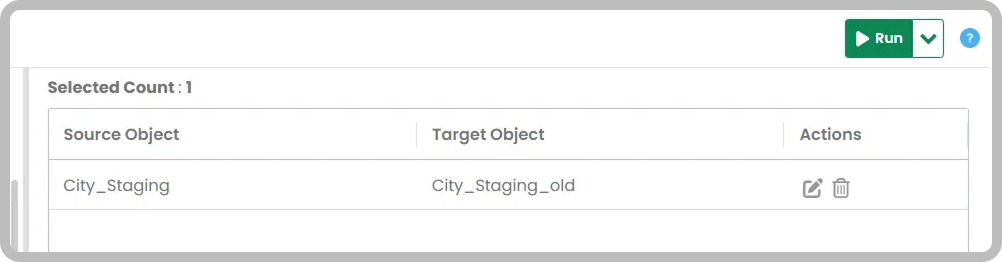
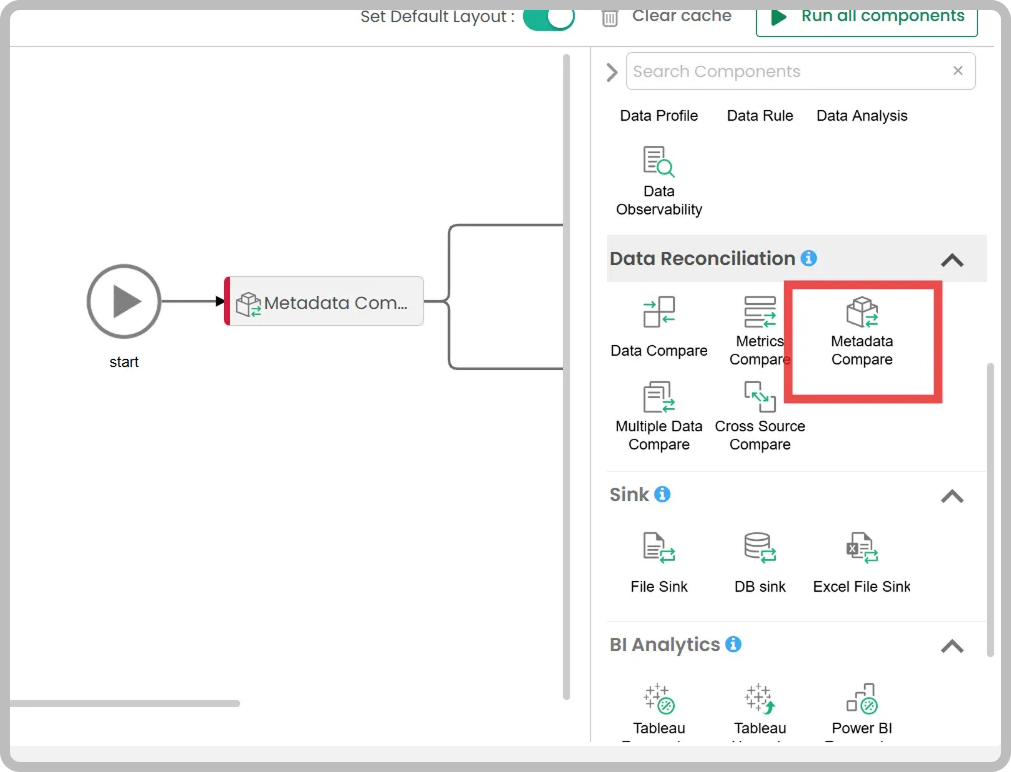
Running this activity produces a detailed output that covers:
- Data type mismatches
- Columns that exist only in the source
- Column length mismatches
- Foreign key and nullability inconsistencies
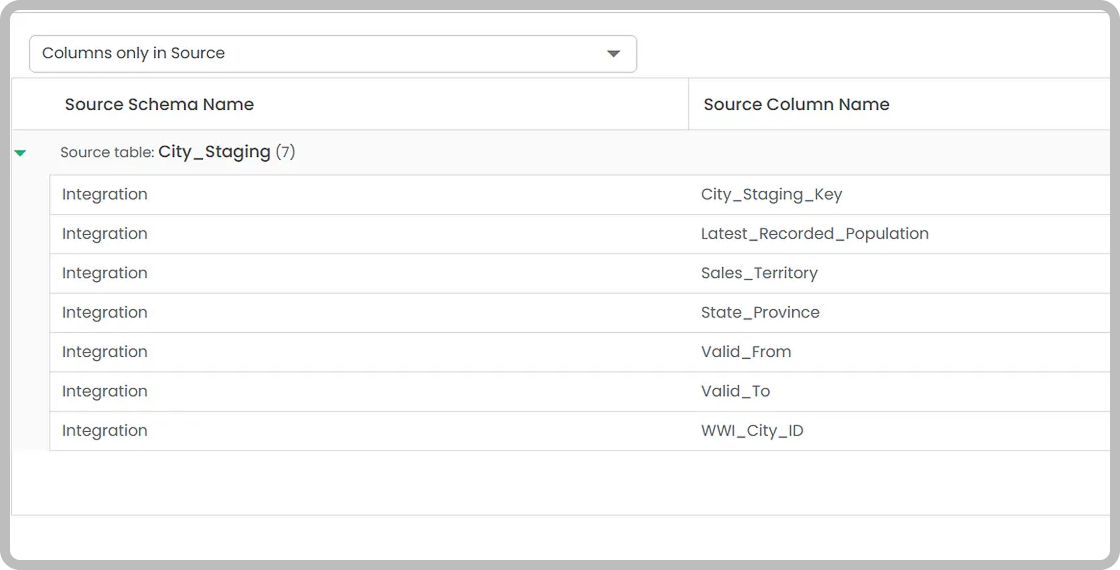
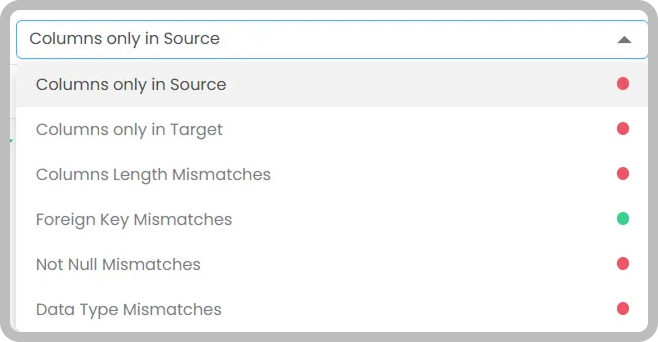
This first layer provides a clear picture of structural differences between the two databases, and resolving these issues before moving to data-level checks helps avoid cascading errors in later validation steps.

Layer 2: How does data profile comparison confirm volume and distribution?
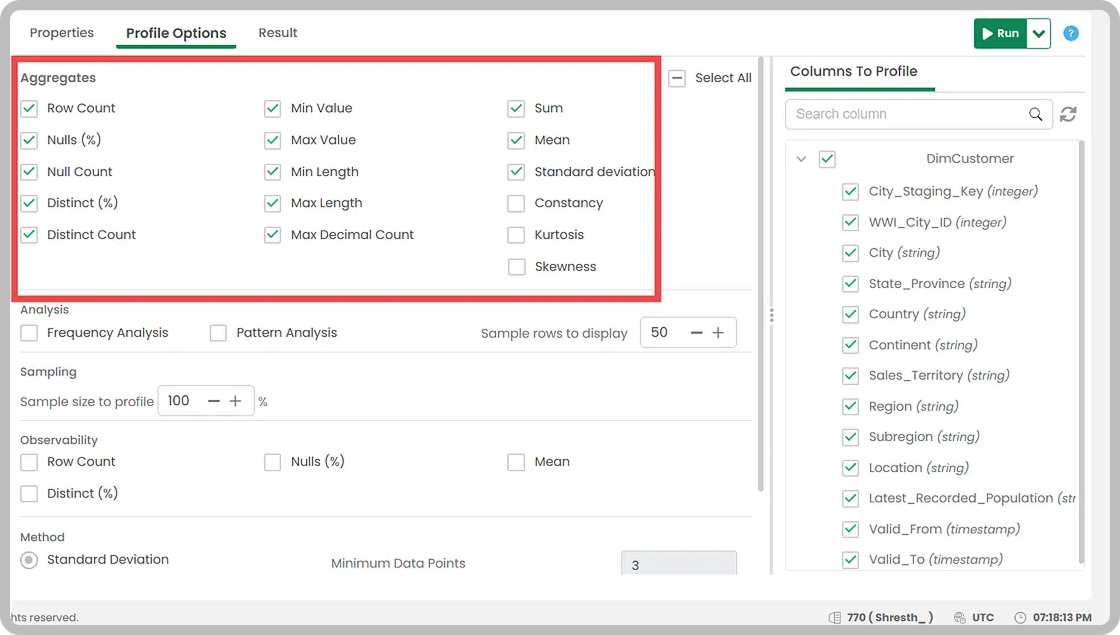
Once the structure has been verified, the next step is comparing the statistical profile of the data across both databases. This includes row counts, null percentages, minimum and maximum values, distinct counts, standard deviation, and related metrics.
The goal is to confirm that the distribution and volume of data is consistent between source and target. Discrepancies at this level can indicate data that was lost, duplicated, or transformed unexpectedly during the migration process.
Datagaps’ Data Profile component supports configurable aggregates, sampling options, and observability metrics. The comparison runs across both systems without requiring custom code, and results are available alongside the broader dataflow output.
Layer 3: How does source-to-target data comparison find row-level mismatches?
This layer compares the data records between source and target row by row, based on mapped columns, to identify exact matches and mismatches.
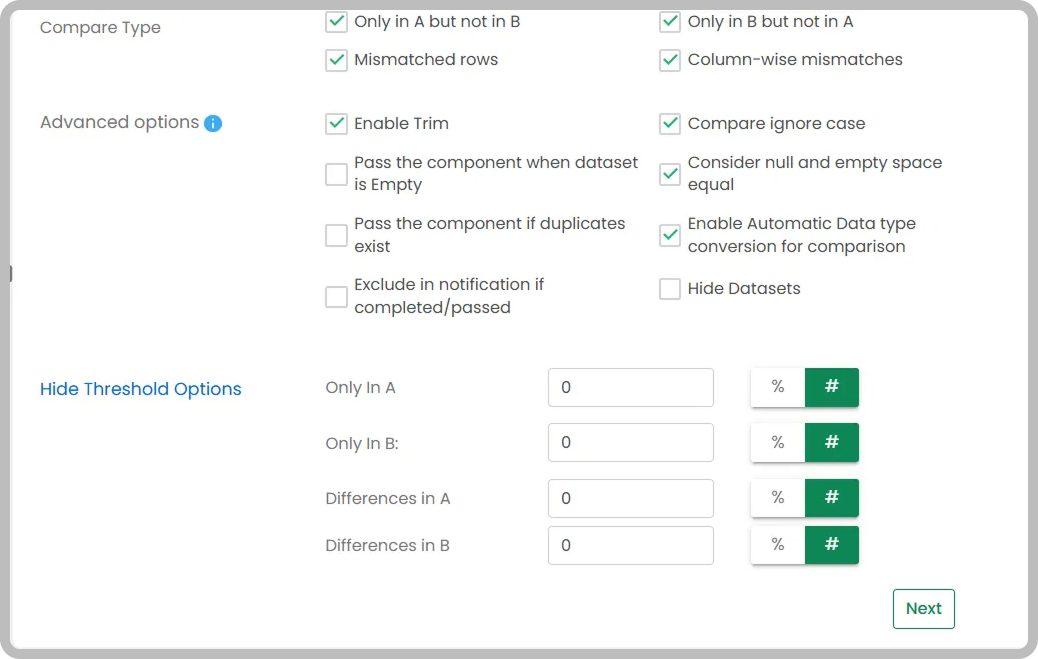
Implementing this manually in Fabric would typically involve building a separate notebook connecting both source and target systems, writing comparison logic, and handling multiple edge cases around data types and nulls. In Datagaps, this is handled through the Data Compare component, which can be added to an existing dataflow alongside the other validation steps. The component supports options including mismatched row detection, column-wise comparisons, null and empty space handling, automatic data type conversion for comparison purposes, and configurable thresholds.
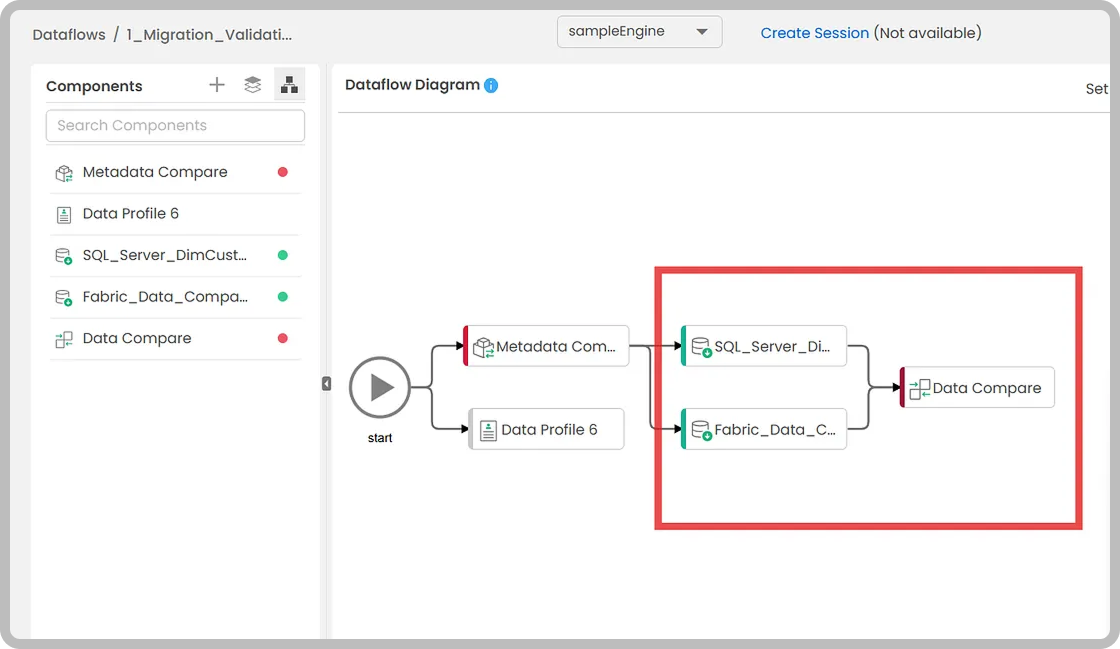
One practical consideration: if metadata issues identified in Layer 1 are not resolved before running data comparison, they are likely to surface here as errors. For example, if certain columns exist in the target but not the source, the comparison will fail at the mapping validation stage. Working through the layers in order is generally the more efficient approach.
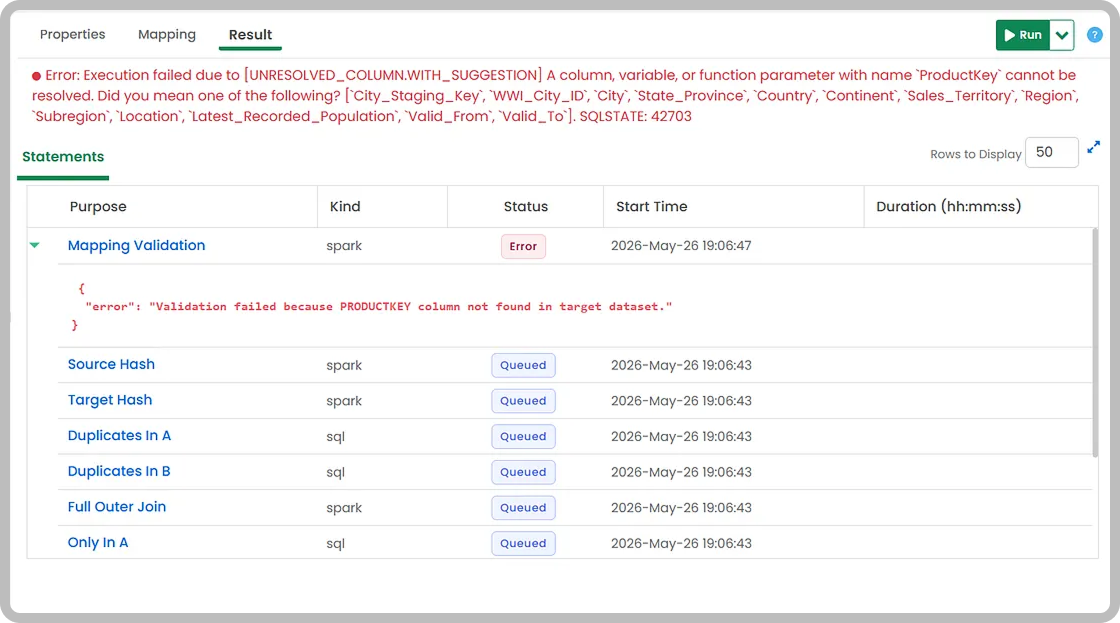
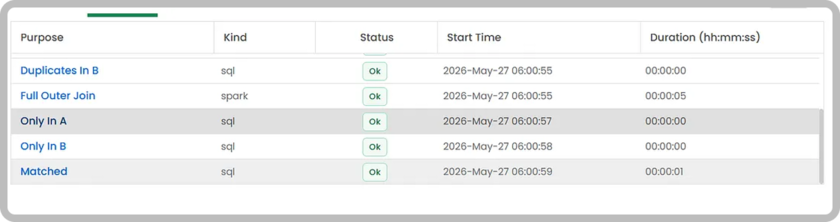
Once mapping issues are addressed, the data comparison produces a report covering matched rows, rows only in source, rows only in target, duplicates, and column-level differences – all available as downloadable datasets for further investigation.
Layer 4: How do you validate transformations and business logic?
Three layers of validation are sufficient for many migrations. For organizations that also need to verify business logic, a fourth layer covers transformation correctness.
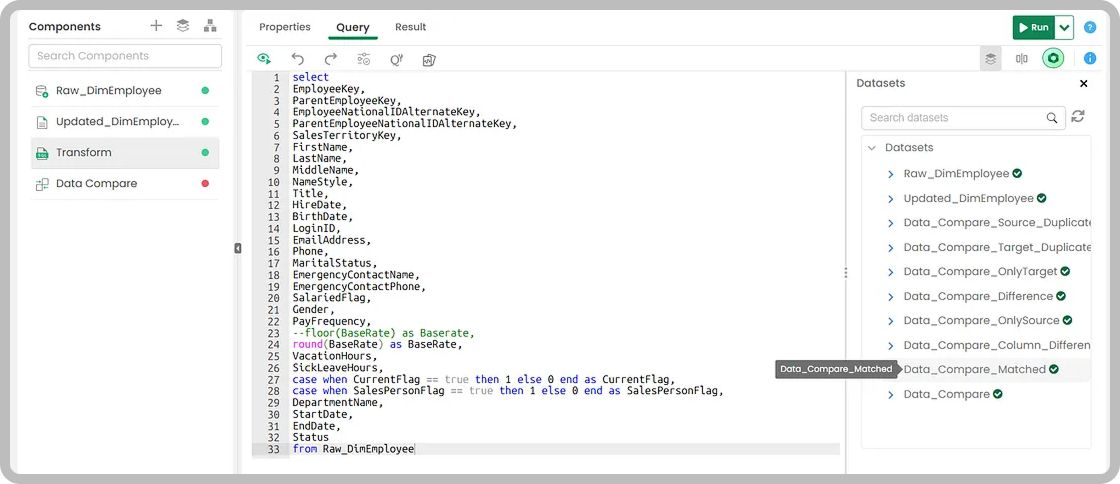
If transformations are applied at the source database as part of the existing data pipeline, this layer checks whether equivalent transformations at the target database produce the same output. Datagaps Transform component in Dataflow allows teams to define custom queries based on their business logic and compare the resulting datasets directly against the target.
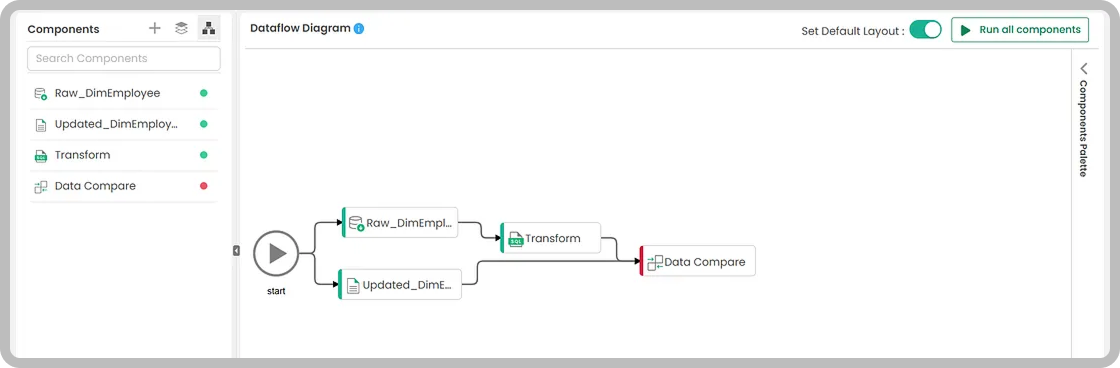
This matters most for migrations that go beyond moving data and re-implement ETL logic in a new environment. After the dataflow runs, you can review all the comparison datasets: matched results, differences, duplicates, and column-level discrepancies. That helps teams find and fix issues faster.
Layer 5: How do you validate BI reports after migrating to Fabric?
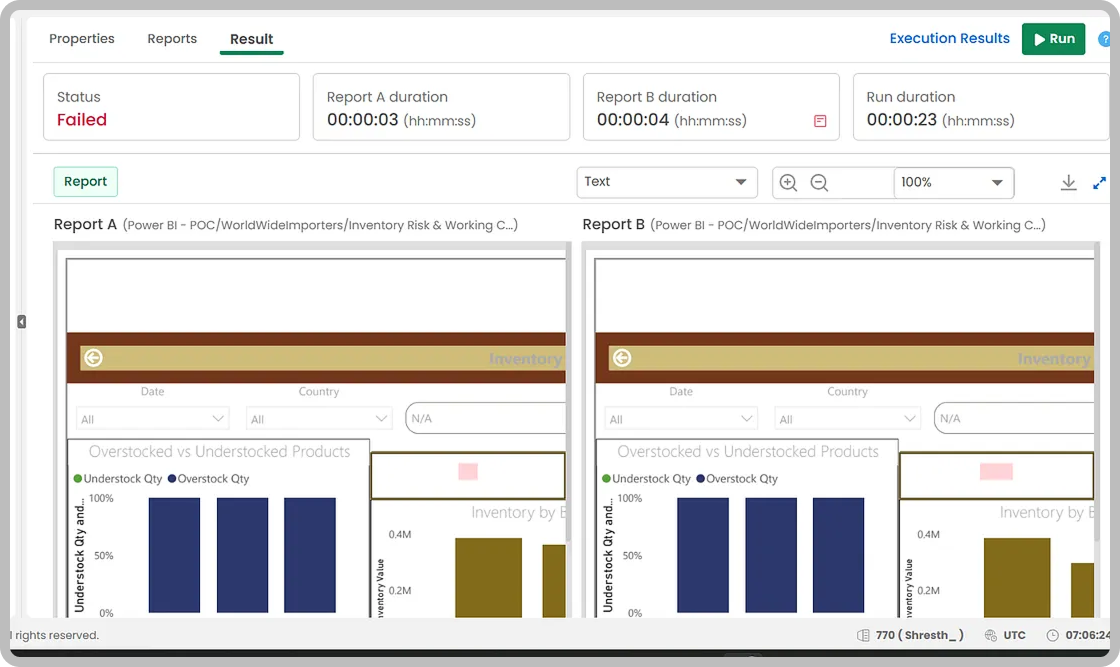
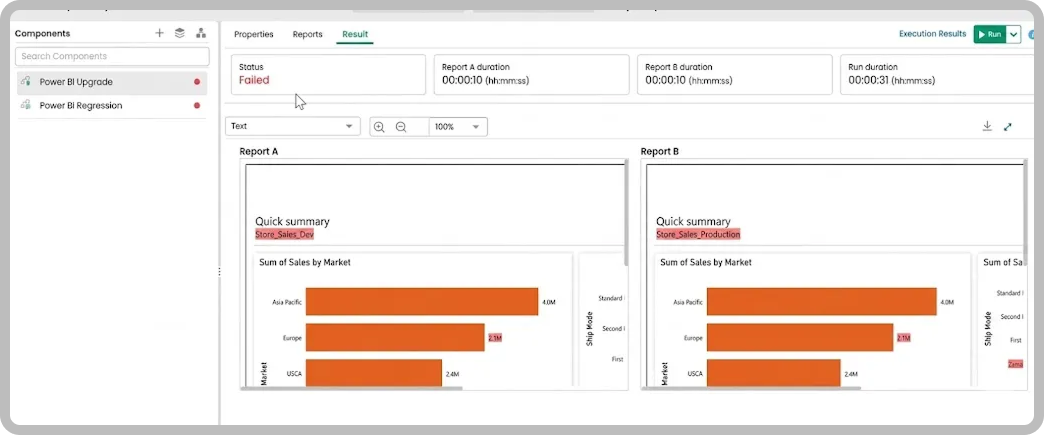
Migration affects the entire data lifecycle, and dashboards are a significant part of that. Organizations migrating Power BI or Tableau reports from SQL Server to Fabric need to verify that those reports continue to render correctly and return accurate data after the migration.
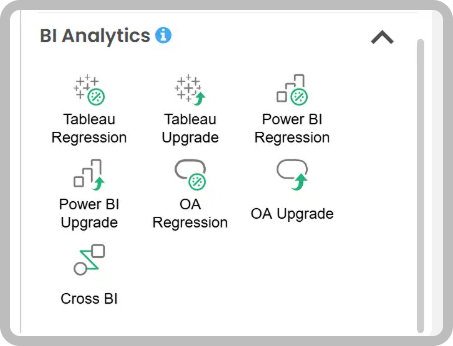
Datagaps supports this through dedicated BI Analytics components, including Power BI Regression, Power BI Upgrade, Tableau Regression, Tableau Upgrade, and Cross BI comparison. These allow reports from source and target environments to be compared both visually and at the data level, covering everything from summary totals to drill-down behaviour.
Closing Thoughts
Microsoft Fabric’s Migration Assistant and related tooling make moving data workloads more manageable than it used to be. Validating that the migration produced accurate results is a separate concern, and it benefits from a structured, repeatable approach.
Fabric helps with migration execution. Datagaps helps with migration validation.
Datagaps dataflow-based testing framework supports all five layers described above and can be configured without writing custom code, so both engineering and analytics teams can use it. For organizations managing data migration projects of any scale, a layered validation process gives them the confidence to confirm that the migration was completed successfully.
Datagaps is a data testing and observability platform that helps data teams validate, monitor, and trust their data pipelines.
Frequently Asked Questions
Does the Microsoft Fabric Migration Assistant validate migrated data?
No. The Fabric Migration Assistant helps move workloads into Fabric and identifies which objects migrate directly and which need adjustments, reducing the overhead of rebuilding schemas. It does not automatically verify that migrated data is fully accurate from a testing standpoint, so a separate, structured validation step is still required.
What are the five layers of Microsoft Fabric migration testing?
Datagaps approaches migration testing in five layers: metadata comparison of structure, data profile comparison of statistical metrics, source-to-target comparison of records row by row, transformation validation of business logic, and BI report validation for Power BI and Tableau dashboards. Each layer addresses a different aspect of data accuracy and consistency.
Why should metadata comparison come first in a Fabric migration test?
Metadata issues left unresolved tend to surface later as errors. If columns exist in the target but not the source, data comparison fails at the mapping validation stage. Checking data types, nullability, keys and constraints first, such as a DECIMAL(18,4) field mapped to a different type, avoids cascading errors in later validation steps.
How does Datagaps compare source and target data row by row?
The Data Compare component, added to a dataflow, compares records based on mapped columns. It supports mismatched row detection, column-wise comparisons, null and empty space handling, automatic data type conversion and configurable thresholds. The report covers matched rows, rows only in source or target, duplicates and column-level differences as downloadable datasets.
Can Datagaps validate Power BI and Tableau reports after a Fabric migration?
Yes. Datagaps provides BI Analytics components including Power BI Regression, Power BI Upgrade, Tableau Regression, Tableau Upgrade and Cross BI comparison. They compare reports from source and target environments both visually and at the data level, covering everything from summary totals to drill-down behaviour.

RajMohan Achanta
Associate Product Manager, Datagaps
Associate Product Manager at Datagaps. Shapes the product experience across ETL Validator, BI Validator, and Data Quality Monitor.

Avinash Keshri
Head, Product Marketing
Head of Product Marketing at Datagaps and IIM Bangalore alumnus. 13+ years of experience in commercializing AI and data platforms across global markets.