The BI landscape is ever-evolving, and possibilities are endless, from enhanced visualization capabilities to seamless integration with the Microsoft ecosystem.Power BI now commands approximately 22.45% of the global BI market vs Tableau’s 17.75%, with 58% of organizations increasing Power BI adoption.
There can be many migration challenges from Tableau to Power BI. However, tools like Datagaps BI Validator are indispensable to ensure an easy and seamless but accurate data transfer that assists you in fully leveraging the Power BI data quality and accuracy. Let’s dive into this blog and learn more about Tableau to Power BI migration. Why are enterprises migrating to Power BI, and what are the possible challenges one faces in this process?
Key Takeaways:
• Tableau to Power BI migration requires four phases: source mapping, calculation translation, visual equivalency, and validation.
• DAX and Tableau LOD expressions are not 1:1 — translation is the hardest part of the migration.
• Assuming visual similarity equals data accuracy is the biggest migration risk.
• Datagaps BI Validator automates cross-platform validation by comparing outputs simultaneously.
Why are Organizations Migrating from Tableau to Power BI?
Organizations are migrating from Tableau to Power BI for several reasons, including cost-effectiveness, integration capabilities, and advanced AI features. Here are a few reasons we have come across:
1. Cost-effectiveness
Power BI mainly offers more cost-effective pricing than Tableau, especially if your enterprise is already a part of the Microsoft ecosystem. Power BI's lower entry price point creates substantial savings on multiple licensing for a large team in a company.
2. Easy Integration with Microsoft Products
As a part of the Microsoft suite, Power BI allows users to integrate effortlessly with Excel, Azure, and Office 365. The ease of integration simplifies the analytics process for businesses, allowing them to streamline workflows and boost productivity.
3. Ease of Use
Tableau and Power BI are both user-friendly; Power BI, however, has a shorter learning curve, especially for Microsoft's existing users. Its interface, usability, and accessibility offer even non-technical users the ease of adoption.
4. Advanced AI feature with ML Capabilities
Power BI has robust AI capabilities with unique features like image recognition, text analytics, and machine learning integrated through Azure. These tools are built into the platform so it can be easily used without any expertise or advanced analytics skills.
5. Robust BI & Data Visualization Capabilities
Tableau is recognized for its advanced visualization capabilities. However, Power BI has significant visualization offerings. Power BI also allows greater customization and flexibility in reports or dashboards, which is vital for companies' decision-making.
6. Better Cloud Integration:
Power BI is fully supported by cloud-based services such as Microsoft Azure. This makes Power BI appealing for organizations seeking to leverage cloud analytics and those transitioning to a cloud-first strategy.
7. Adhere to Compliance and Security:
For enterprises constantly concerned about complaints and data security, Power BI offers robust data security that integrates tightly with Microsoft's security tools. This integration assists with various regulatory standards and ensures compliance, especially for industries such as healthcare and finance.
What Are the Key Challenges in Tableau to Power BI Migration?
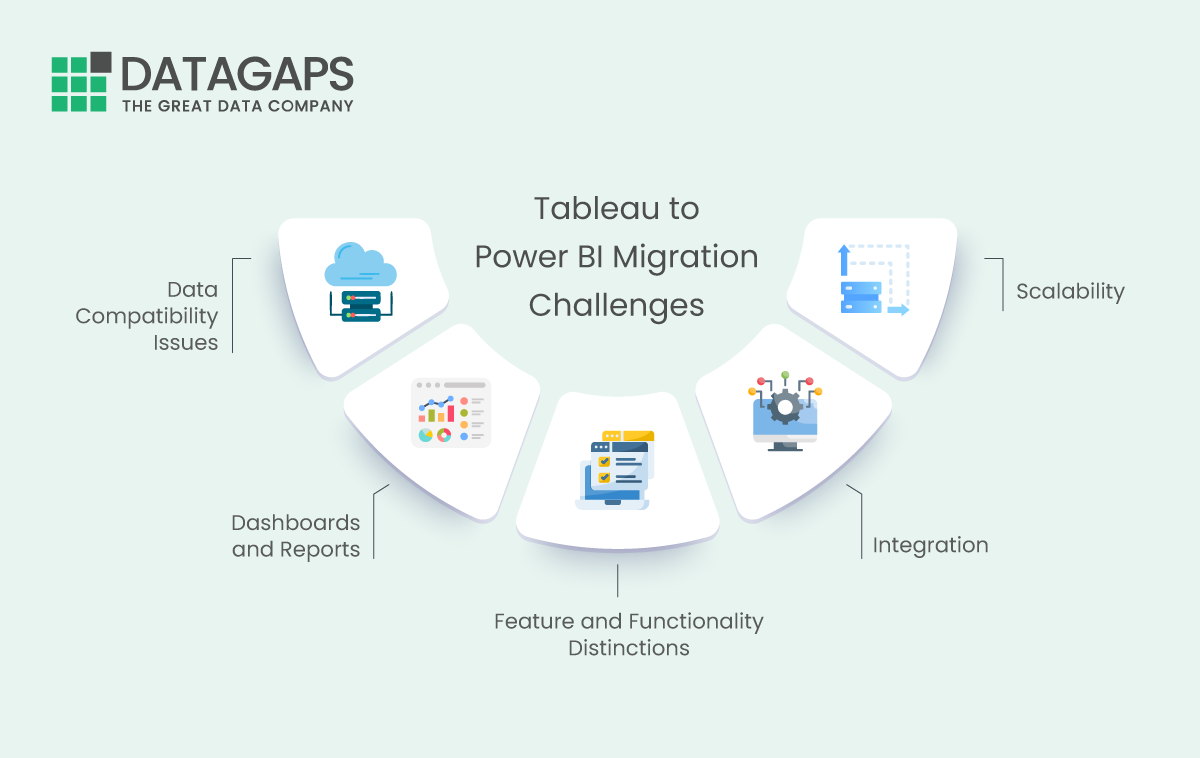
Migrating from Tableau to Power BI presents significant challenges that require careful management to ensure a smooth transition and effective utilization of the new platform.
IDC estimates unplanned application downtime costs Fortune 1000 companies $1.25–$2.5 billion annually. Failed BI migrations contribute through delayed reporting and rework. Forrester named Power BI a Leader in the Q2 2025 Wave, stating it “fulfills almost any enterprise BI requirement”. This is accelerating migration timelines.
1. Data Compatibility Issues
Migrating data from Tableau to Power BI can cause compatibility issues due to data models and function distinctions.
2. Dashboards and Reports
Transferring Tableau dashboards and reports to Power BI can be time-consuming or time-wasting, especially if done manually. This requires a profound experience in both imitating functionality and visualizations.
3. Feature and Functionality Distinctions
Tableau and Power BI differ in terms of their features and reporting functionalities in various attributes and how they handle specific analytics.
4. Integration with additional Systems:
Migration from Tableau to Power BI can be tedious if seamless integration is not established for automated reporting and data analytics.
5. Scalability
Companies should run automated testing to find and fix anomalies for the best performance after Tableau to Power BI. Power BI can handle complex and large datasets.
| Feature | Tableau | Power BI Equivalent |
|---|---|---|
| Calculated Fields | Tableau Calculated Fields | DAX Measures / Calculated Columns |
| Parameters | Tableau Parameters | What-if Parameters / Slicers |
| LOD Expressions | FIXED, INCLUDE, EXCLUDE | CALCULATE + Filter Context |
| Data Blending | Cross-Database Blending | Power Query Merge / Append |
| Dashboard Actions | Filter, Highlight, URL Actions | Drillthrough, Bookmarks, Buttons |
| Row-Level Security | User Filters | RLS Roles in Data Model |
How Do You Automate Tableau to Power BI Migration Testing?
Tableau to Power BI Migration Testing Steps
Migrating from Tableau to Power BI can be tedious and complex, involving multiple steps to ensure data integrity and report accuracy throughout the transition. Using tools like Datagaps BI Validator can significantly streamline this process by automating the testing and validation stages, reducing the risk of errors and oversight.
Here’s a step-by-step guide to effectively manage Tableau to Power BI migration testing with Datagaps BI Validator:
1. Initial Assessment and Planning
Inventory Existing Reports: Begin by cataloging all existing Tableau reports. Note their data sources, dependencies, complexity, and usage frequency.
Data Preparation and transformation: Segmentation of the file types to filters needs to be prepared
Define Objectives: Clearly outline the goals for migrating to Power BI, including any enhancements or changes in functionality.
Plan Migration: Develop a migration plan prioritizing reports based on business importance and usage. This plan should also include a timeline and resource allocation
2. Environment Setup
Configure Power BI Environment: Set up the Power BI environment to mirror the Tableau setup as closely as possible to facilitate accurate testing.
Install BI Validator: Ensure that the BI Validator is appropriately installed and configured to connect both to your Tableau and Power BI environments.
3. Migration of Reports
Migrate Reports: Start with migrating reports as planned, beginning with less complex reports to gauge the migration process.
Volume of large datasets: With a clear understanding of the volume required to migrate, a phase-wise approach works best here.
Utilize BI Validator for Initial Checks: As each report is migrated, use BI Validator to perform initial validation checks. This includes comparing data connections and checking that all data sources are correctly linked.
4. Automated Testing with BI Validator
Data Testing: Use BI Validator’s Data Testing module to compare data outputs from Tableau and Power BI reports. Ensure consistency in data retrieval and calculations.
Report Layout Testing: Employ the Layout Testing feature in BI Validator to verify that the report layouts in Power BI match the original Tableau reports. This is crucial for visualizations and formatted reports.
Performance Testing: Test and compare the performance of reports on both platforms. BI Validator can help identify reports that may experience performance degradation post-migration.
5. Iterative Validation
User Validation: Engage end-users in testing to validate the usability and accuracy of the migrated reports. Collect feedback and adjust, as necessary.
Regression Testing: Regression tests are performed regularly during the migration phase to catch any new errors or issues that arise as more reports are converted.
6. Final Audit and Go-Live Preparation
Complete Audit: Conduct a final comprehensive check using BI Validator to ensure all aspects of the reports function as expected.
Prepare for Go-Live: Finalize any necessary user training and prepare documentation on the new Power BI reports.
Go-Live: Deploy the migrated reports to the production environment.
7. Post-Migration Support
Monitor Reports: Post-migration, monitor the reports for any issues and optimize performance as needed. Use the existing setup to monitor it.
Ongoing Maintenance: Use BI Validator for ongoing maintenance and continuous monitoring of the Power BI environment to ensure sustained report accuracy and performance.
By following these steps and leveraging datagaps BI Validator, organizations can facilitate seamless and more reliable migration from Tableau to Power BI. This structured approach helps minimize disruptions and ensures data accuracy, which is crucial for critical business decisions.
How Does BI Validator Automate Migration Testing?
1. Validation of Data Accuracy
During the migration from Tableau to Power BI, the BI Validator ensures that all data is accurately transferred. It validates the data extracted from Tableau against what is loaded into Power BI, checking for disparities and anomalies. This helps confirm that the migration process does not alter the data, ensuring information fidelity across platforms.
2. Automated Testing of Reports
The BI Validator can automate the testing of reports and dashboards in Tableau and Power BI. This is particularly useful in migration scenarios to compare the output of reports between the two platforms. Automated testing helps identify differences in how reports are generated or displayed, allowing for adjustments before full deployment.
3. Streamlining Regression Testing
Any changes or updates to the data or reports must be thoroughly tested during migration. BI Validator facilitates regression testing by automatically detecting and reporting changes that could affect the performance or output of Power BI reports previously handled by Tableau. This ensures that updates or migrations refrain from introducing new errors or regressions.
4. Cross-Environment Validation
BI Validator helps with cross-environment testing, providing reports function correctly across different environments. This is critical when migrating to Power BI from Tableau.
5. Performance Testing
BI Validator also helps to ensure that the reports and dashboards perform optimally in Power BI after migration from Tableau. It can simulate load and stress tests to ensure that the new Power BI setup can handle the expected data volumes and user interaction without degradation in performance.
6. Enhancing Data Governance
Many enterprises have their IT compliance, and maintaining robust data governance becomes critical as data moves from Tableau to Power BI. BI Validator helps enforce governance policies by ensuring data quality and compliance standards are met throughout the migration process. This includes data validation and data integrity checks.
7. Simplifying Data Integration Testing
If the migration involves integrating Power BI with other systems previously integrated with Tableau, BI Validator can simplify and automate the testing of these integrations. It ensures data flows seamlessly between Power BI and other enterprise systems without data loss or corruption.
By leveraging Datagaps BI Validator in a Tableau to Power BI migration, organizations can significantly reduce the risks associated with such changes, ensure data quality, maintain report accuracy, and optimize the performance of their new BI setups. BI Validator provides a comprehensive suite of testing and validation features that streamline the transition process, making it smoother and more reliable. Datagaps BI Validator automates cross-platform validation.
Why Choose Datagaps?
Choosing Datagaps BI Validator for a Tableau to Power BI migration offers several compelling advantages.
Here’s why it stands out as an essential tool for this migration process:

1. Automated Validation Processes
Datagaps BI Validator automates the validation of data and reports between Tableau and Power BI, significantly reducing the manual effort involved. This automation ensures that all data is accurately migrated and that all reports function as expected without intensive manual testing, which is time-consuming and prone to errors.
2. Comprehensive Data and Report Testing
The BI Validator provides thorough testing capabilities that cover every aspect of the migration:
- Data Accuracy Checks: Ensures all data migrated from Tableau to Power BI is accurate and intact, with no data loss or corruption.
- Report Comparisons: Automatically compares reports generated in Power BI against their counterparts in Tableau to ensure visual and functional parity.
- Performance Benchmarks: Tests the performance of Power BI solutions to ensure they meet or exceed the performance levels of the Tableau environment.
3. Seamless Integration
Datagaps BI Validator integrates smoothly with Tableau and Power BI platforms, facilitating a seamless migration process. This integration allows for direct comparisons and validations within the migration workflow, making tracking and resolving discrepancies easier.
4. Enhanced Efficiency and Reduced Migration Time
By automating the testing process, Datagaps BI Validator significantly cuts down on the migration timeline. Quick validations and immediate feedback on errors allow teams to address issues promptly without the lengthy cycles associated with manual testing.
5. Minimization of Migration Risks
The accuracy and thoroughness of Datagaps BI Validator in testing and data validation minimizes the risks associated with migration, such as data loss, report inaccuracies, and performance degradation. This risk mitigation is crucial for maintaining data integrity and business continuity during and after the transition.
6. Support for Complex Datasets
Datagaps BI Validator is designed to handle complex data environments and large datasets, typical in Tableau and Power BI setups. Its robust testing framework can manage detailed, multi-layered data validation processes necessary for large-scale migrations.
7. Regulatory Compliance and Data Security
The tool ensures that all data handling and processing during the migration comply with regulatory standards, maintaining the security and privacy of enterprise-sensitive data. This compliance is critical for organizations in regulated industries such as finance and healthcare.
8. Scalability and Flexibility
Datagaps BI Validator scales to accommodate the scope of any migration project, from small businesses to large enterprises. Its flexible testing framework can be tailored to specific organizational needs and complexities, providing a custom fit for any migration scenario.
By leveraging Datagaps BI Validator for your Tableau to Power BI migration, you can ensure a thorough, risk-minimized transition with sustained benefits in data handling accuracy, report reliability, and overall BI performance.
Choosing Datagaps BI Validator for your Tableau to Power BI migration is more than a practical decision; it’s a strategic move towards future-proofing your business intelligence systems. With its powerful automation features, comprehensive validation capabilities, and seamless integration, Datagaps BI Validator ensures that the Power BI transition is efficient and effective. Minimizing risks and enhancing data and report accuracy empowers organizations to navigate the complexities of migration and thrive in a data-driven environment.
Frequently Asked Questions:
1) Why are organizations migrating from Tableau to Power BI?
Common reasons include Microsoft 365 ecosystem integration, lower licensing costs for existing Microsoft customers, Power Automate and Azure integration, and organizational standardization on the Microsoft stack.
2)What are the biggest risks in a Tableau to Power BI migration?
Calculation of translation errors (Tableau LOD expressions to DAX are not 1:1), data source reconnection failures, visual behavior differences between platforms, and assuming that similar-looking dashboards contain accurate data.
3)How do you validate data accuracy after migrating from Tableau to Power BI?
Compare report outputs between Tableau and Power BI for every dashboard, visual, and filter combination. Datagaps BI Validator automates this by connecting to both platforms and running side-by-side comparisons.
4)What is the hardest part of translating Tableau to Power BI?
LOD (Level of Detail) expressions in Tableau have no direct equivalent in DAX. Translating FIXED, INCLUDE, and EXCLUDE calculations into CALCULATE with the correct filter context requires a deep understanding of both platforms.
5) How long does a Tableau to Power BI migration typically take?
It depends on scope, but enterprise migrations with hundreds of dashboards typically take 3-6 months including planning, migration, validation, and user training. Automated validation with BI Validator can reduce the testing phase significantly.

Avinash Keshri
Head, Product Marketing
Head of Product Marketing at Datagaps and IIM Bangalore alumnus. 13+ years of experience in commercializing AI and data platforms across global markets.